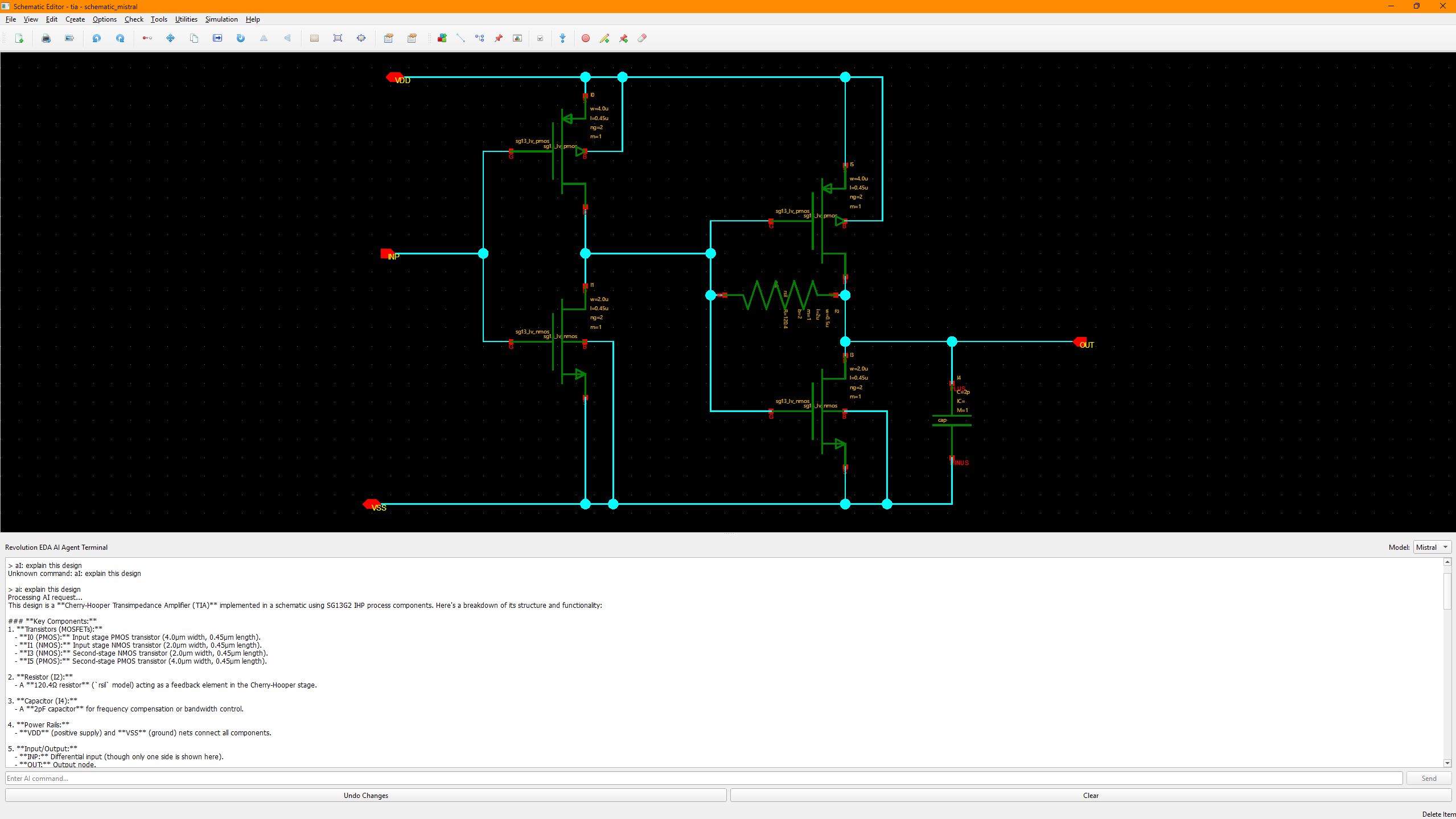
AI Terminal Plugin for Revolution EDA
Overview
The aiTerminal plugin provides an AI-powered terminal for editing schematic, symbol, layout, and simulation-bench views using natural-language requests. The current plugin supports Anthropic Claude, Google Gemini, and OpenAI models. AI provider API access and usage are separate from the plugin license.
Features
- AI-Powered Design Modification: Use natural language to request changes to your designs
- Multiple AI Providers: Select Claude, Gemini, or OpenAI models in the terminal
- Validated Design Changes: Candidate edits are checked against design schemas and local library resources before being saved
- Backup and Undo: Recovery backup and editor undo support for applied modifications
- Design Commands: Inspect views with
read, request changes withai:, or useops:and planning commands for structured tasks - View Creation: Generate symbol views, testbench schematics, and revbench testbenches with dedicated commands
- Deterministic Layout Planning:
layplan:turns natural-language placement requests into layout records with grid snapping, PCell parameter checks, and via construction - Context and References: Pin example schematics (
context:) or a cross-view design reference (ref:) to guide AI output - Session Memory and Cost Reporting: Per-window conversation history with token and cost tracking;
newresets the session - Secure API Key Management: Fernet-encrypted storage of provider API keys
- Customizable AI Instructions: User and project instruction files tailor AI behavior
- License Management: Commercial license validation at use time
Installation
- Check Plugins → Browse Plugins… for a compatible package, or place the plugin in your configured
REVEDA_PLUGIN_PATHdirectory. - Restart Revolution EDA after installing or changing the plugin path.
- Activate a valid license and provide your own API key for the selected AI provider. Registry availability may differ by platform.
Usage
Opening the Terminal
Open the AI Terminal via Utilities → AI Terminal or use the keyboard shortcut Ctrl+T. The terminal appears as a panel inside the editor window. It is available in the Schematic Editor, Symbol Editor, and Layout Editor, and in the Simulation Environment via Tools → AI Terminal for testbench requests.
Setting Up API Keys
Before using the AI features, you need to set your API key:
- Select your preferred model from the dropdown in the terminal title bar
- Type
setkeyand press Enter - Enter your API key when prompted
- The key will be encrypted and stored securely in
~/.reveda/api_keys.enc
Basic Commands
help— Display available commandsread— Print the current design JSONundo— Revert the last applied AI changenew— Start a fresh AI session (clears conversation memory)setkey— Store or update the selected provider’s API keylicense— Show installed license informationai:<request>— Modify the open design with the selected modelops:<request>— Request targeted edits instead of a full design rewriteplan:<request>— Generate or restructure a schematic with explicit symbol referenceslayplan:<request>— Generate layout records through the deterministic plan pipelinetb:<request>— Generate or modify testbench settings in a revbench viewtbnew:<request>— Create a new revbench testbench for the current schematic or config viewsymnew:<request>— Create a symbol view for the current schematictbschematic:<request>— Create a testbench schematic in a new<dut>_tbcellcontext:<library/cell[, ...]>— Select example schematics as read-only style/topology reference (context:show/context:clearto inspect or clear)ref:<library/cell/view>— Select one read-only cross-view design reference (ref:show/ref:clearto inspect or clear)
Example Requests
ai:Add a 100fF capacitor between nodes A and Bai:Change the width of NMOS current mirror transistors to 1.0umai:Connect the output of inverter I1 to the input of NAND gate N1ai:Create a differential pair with matched transistors
Model Selection
Switch between AI models using the dropdown in the terminal title bar:
- Claude — Anthropic models
- Gemini — Google models
- OpenAI — ChatGPT models
Customizing AI Instructions
The AI Terminal supports configurable instruction files that let you tailor AI behavior per model or per project.
Configuration
Create an ai_config.json in one of these locations:
~/.reveda/ai_config.json— user-wide configuration./ai_config.json— project-specific configuration (overrides user config)
Example configuration:
{
  "instruction_paths": {
    "base_dir": "~/.reveda/ai_instructions",
    "claude": "claude.md",
    "gemini": "gemini.md",
    "openai": "openai.md",
    "general": "general.md"
  },
  "fallback_instructions": {
    "enabled": true,
    "use_builtin": true
  }
}
Instruction Files
Place markdown instruction files in the configured directory (default: ~/.reveda/ai_instructions/). Each model can have its own instruction file, plus a shared general.md that applies to all models. Built-in fallback instructions are used when external files are missing.
Security
- API keys are encrypted using Fernet symmetric encryption and stored in
~/.reveda/api_keys.enc - The encryption key is stored separately in
~/.reveda/key.enc - The plugin requires a valid license to operate; license validation runs inside compiled plugin code
License
Commercial — proprietary add-on to Revolution EDA. A valid license key is required.