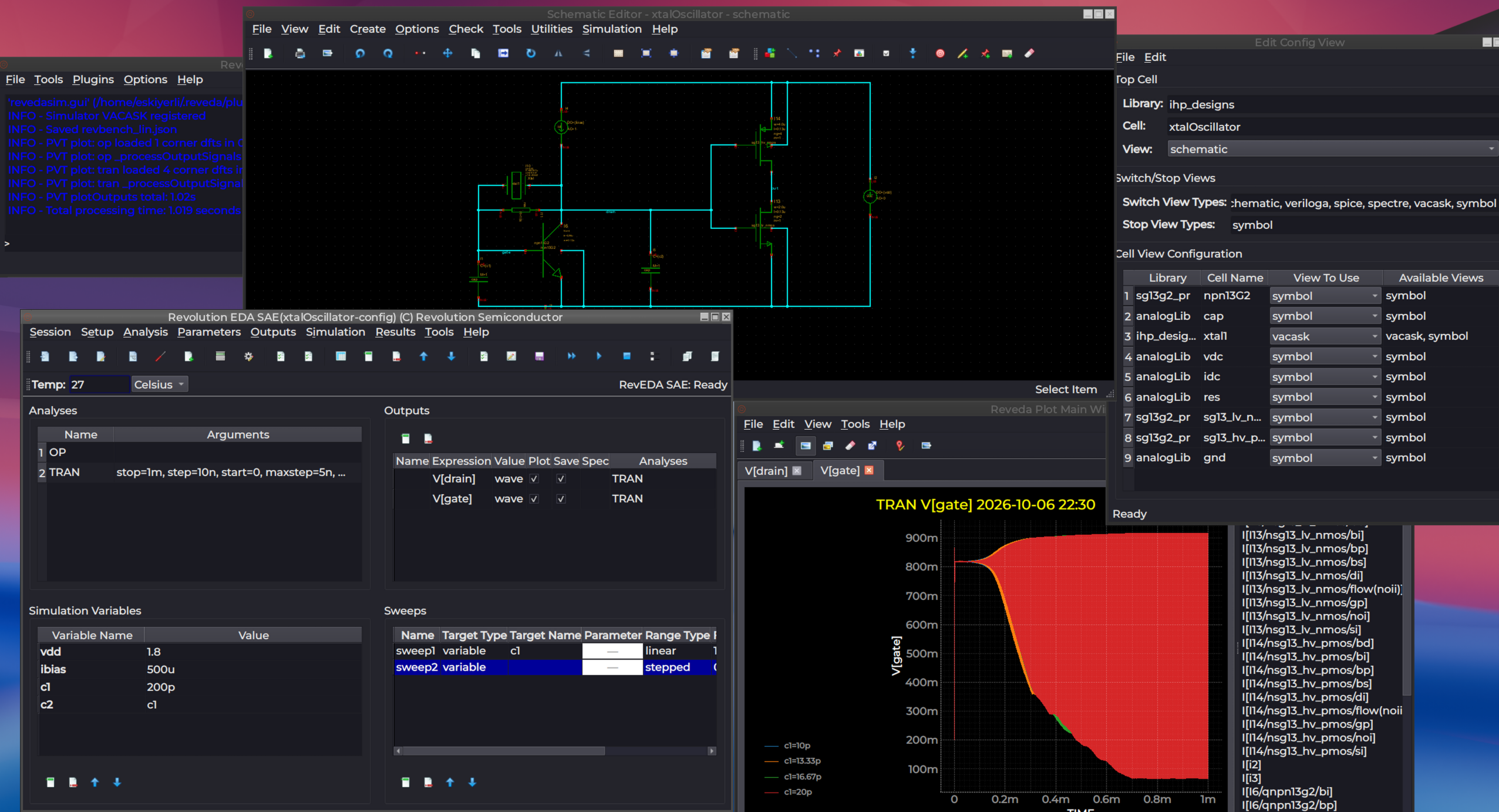
RevEDA Plot Plugin
RevEDA Plot (revedaPlot) is an advanced waveform visualization and analysis plugin for Revolution EDA that provides interactive plotting capabilities for circuit simulation results. It features a modern PyQtGraph-based interface with support for multi-dimensional data visualization, parameter sweep plotting, real-time measurement tools, and high-quality plot export functionality, seamlessly integrating with the revedasim plugin for comprehensive simulation workflow.
Features
Visualization Capabilities
- Interactive Waveform Plotting: Real-time zoom, pan, and measurement on simulation waveforms
- Multi-Plot Support: Combined and separate plot views for different signal types
- Parameter Sweep Visualization: Automatic plotting of parametric simulation results with clear parameter identification
- Data Frame Integration: Native support for Polars DataFrame structures for efficient data handling
- Dynamic Plot Updates: Live plot updates during simulation execution
- AC Signal Detection: Automatic detection of complex signal pairs (Re/Im) with magnitude and phase display
User Interface
- Tabbed Interface: Multiple plot tabs for organizing different analyses and results
- Customizable Layouts: Flexible plot arrangement with resizable panels
- Interactive Legends: Click a legend label to highlight its curve (thicker line, other curves dimmed); Ctrl+click for multi-select; click the line swatch to toggle visibility; right-click for curve colour, hide/show, CSV copy, and Signal Calculator integration
- Context Menus: Right-click access to plot operations and settings
- Measurement Tools: Built-in cursors, markers, and measurement capabilities
- Plot Data Dock: Dockable panel listing available data columns — double-click to plot, or drag a signal onto an existing plot or empty space to create a new plot row
- Clipboard Data: Copy curve data to the clipboard as CSV, or paste CSV/TSV data as a new curve
- Recent Files: Quick access to the last 4 opened data files
Plot Types and Formats
- Time-Domain Plots: Transient analysis results with time-based x-axis
- Frequency-Domain Plots: AC analysis with automatic logarithmic frequency scale
- Parametric Plots: DC sweep and parameter variation visualization
- Noise Plots: Noise spectral density visualization
- Harmonic Balance: HB frequency-domain and time-domain analysis results
- Combined Plots: Multiple signals on single plot with automatic color cycling
- Separate Plots: Individual plots for each signal with independent Y-axis scaling
Measurement and Analysis
- Vertical Line Cursor: Draggable vertical line with interpolated Y-values at each curve intersection
- Horizontal Line Cursor: Draggable horizontal line with interpolated X-values at each curve intersection
- Marker Mode: Triangle markers that snap to the nearest data point
- X-Axis Zoom: Click-and-drag zoom on the X-axis (shortcut: X)
- Y-Axis Zoom: Click-and-drag zoom on the Y-axis (shortcut: Y)
- Rectangular Zoom: Box-select zoom on both axes (shortcut: Z)
- Fit All: Auto-scale to show all data (shortcut: F)
- Lines/Points Toggle: Switch between continuous lines and discrete point markers
Signal Calculator
The built-in Signal Calculator (Tools → Signal Calculator, Ctrl+K) provides:
- Expression Evaluation: Evaluate mathematical expressions on plotted signals
- Complex Operations:
db,mag,rad,deg,psd - Scalar Reductions:
max,min,ave,rms,pp - Value Lookups:
yvalue,xvalue,slope - Column Transforms:
integ,deriv,dft,log,log10,exp,power,smooth,sqrt,abs,inv - Arithmetic: Addition, subtraction, multiplication, and division between signals
- Parametric Sweep Support: Evaluate expressions across all sweep runs
- Expression History: Recall previously evaluated expressions
- Direct Plotting: Plot calculated results immediately or add to the data list
Export and Documentation
- PNG Export: High-quality PNG export with white background (Ctrl+P)
- JPEG Export: JPEG export for compact file sizes (Ctrl+J)
- Plot Annotations: Title and axis labeling with parameter information
- Back Annotation: Annotate simulation results back onto schematic editors
Data Processing
- Polars DataFrames: High-performance columnar data processing
- Binary Raw File Parsing: Direct reading of Xyce binary raw files with complex number support
- ASCII PRN File Parsing: Reading of Xyce ASCII output files with multi-section support
- Parameter Sweep Handling: Automatic extraction of swept parameter names and values from step analysis headers
- SI Prefix Handling: Automatic unit prefix formatting for display
Integration Features
Plugin Architecture
- Seamless Integration: Direct integration with Revolution EDA’s plugin system
- revedasim Compatibility: Automatic data reception from the simulation plugin via the Results menu
- Back Annotation: Display simulation operating point values directly on schematic nets
- Clear Annotations: Remove back-annotated values from schematics
- License Management: Built-in license validation; a valid license is required
Results Menu Actions
The plugin adds three actions to the Results menu in the Simulation window:
- Plot Results: Plot output signals defined in the simulation setup
- Back Annotate: Annotate DC operating point or transient values onto schematic editors
- Clear Annotations: Remove all annotations from related schematic editors
Data Interface
- RAW Files: Xyce binary raw file format with support for real and complex data sections
- PRN Files: Xyce ASCII print file format with multi-section parametric sweep support
- VACASK Files: VACASK raw and ASCII output files, including multiple plots from a single simulation run
- Touchstone Files: S-parameter (.sNp) files for RF analysis workflows
- RES Files: Automatic reading of associated .res metadata files for sweep parameter labels
- Data Validation: Automatic data integrity checking and error handling
Supported Analysis Types
- Transient Analysis: Voltage/current vs time waveforms
- DC Sweep Analysis: Voltage/current vs swept parameter
- AC Analysis: Magnitude and phase frequency response (automatic log-scale X-axis)
- Noise Analysis: Noise spectral density visualization
- Harmonic Balance: Frequency-domain and time-domain steady-state results
- Parametric Sweeps: Multi-run results with automatic parameter labeling
User Interface Elements
Main Window
- Plot Canvas: Primary plotting area with interactive controls (PyQtGraph-based)
- Toolbar: Quick access to open, plot mode, markers, export, and clear operations
- Plot Data Dock: Right-side dockable panel showing available signals for plotting
- Tab Widget: Multiple closable plot tabs for organizing different analyses
- Status Bar: Real-time information about plot state and measurements
- Menu System: File, Edit, View, Tools, and Help menus
Keyboard Shortcuts
| Shortcut | Action |
|---|---|
| Ctrl+O | Open Data File |
| Ctrl+T | New Tab |
| Ctrl+P | Export to PNG |
| Ctrl+J | Export to JPEG |
| Ctrl+Q | Exit |
| Ctrl+Shift+C | Combined Plot |
| Ctrl+S | Separate Plots |
| Ctrl+L | Clear Plot |
| Ctrl+M | Toggle Marker Mode |
| Ctrl+K | Signal Calculator |
| Ctrl+V | Toggle Vertical Line |
| Ctrl+H | Toggle Horizontal Line |
| X | X-Axis Zoom |
| Y | Y-Axis Zoom |
| Z | Rectangular Zoom |
| M | Marker Mode |
| V | Vertical Line |
| H | Horizontal Line |
| L | Toggle Lines/Points |
| F | Fit All |
| Esc | Disable all modes |
| F1 | User Guide |
Installation and Usage
The revedaPlot plugin is automatically loaded when Revolution EDA starts. A valid license is required. Access plotting features through:
- Automatic Launch: Plots appear automatically when simulation completes via Results → Plot Results
- Manual Launch: Open data files directly with File → Open Data File (Ctrl+O) supporting .raw and .prn formats
- Back Annotation: Annotate simulation values onto schematics via Results → Back Annotate
- Export Functions: Save plots as PNG or JPEG for documentation
License
Commercial — proprietary add-on to Revolution EDA. A valid license key is required.